
A Production Architecture Guide
OAuth2 is the backbone of modern authorization, but building it correctly at scale is harder than it looks. In this post, I’ll walk through how we implemented Ory Hydra — a certified OAuth2 and OpenID Connect server — in a production cloud environment. I’ll cover the infrastructure design, client registration, the full authorization code flow, and JWT token validation.
What Is Ory Hydra?
Ory Hydra is an open-source, hardened OAuth 2.0 and OpenID Connect (OIDC) server written in Go. Unlike other identity providers, Hydra does not handle login or user management itself. Instead, it delegates authentication and consent to your own Identity Provider (IdP) — giving you full control over the user experience while offloading the complexity of the OAuth2 protocol.
This separation of concerns is the key design insight: Hydra handles the protocol, you handle the people.
Architecture Overview
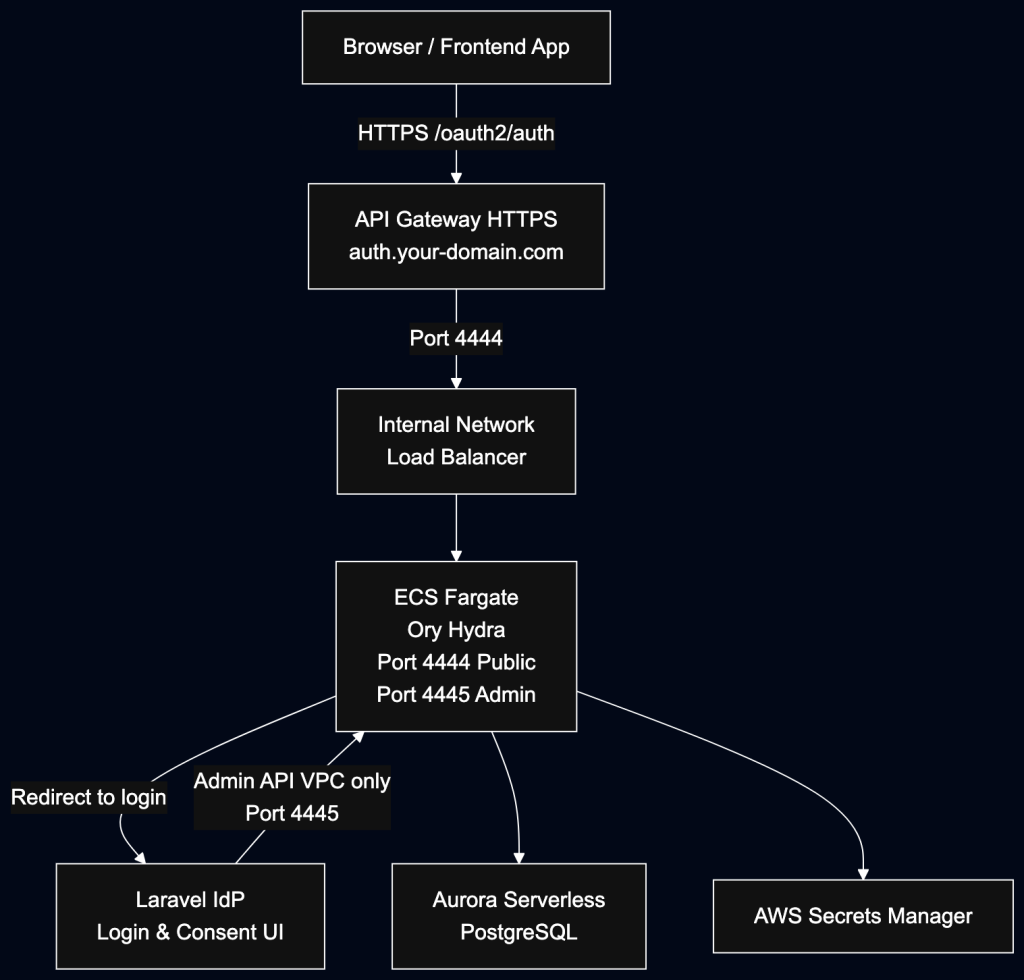
Our setup runs Hydra inside a private VPC on AWS, exposing only the public-facing endpoints through API Gateway. The Admin API never touches the public internet. Here we implemented the IDP using Laravel but any backend framework can be used.
Key Components
| Component | Role |
|---|---|
| API Gateway | Public HTTPS entry point; TLS termination; routes to Hydra’s public port |
| ECS Fargate (Hydra) | Stateless OAuth2 server; two ports: 4444 (public), 4445 (admin) |
| Internal NLB | Exposes Hydra internally; Admin API never leaves the VPC |
| Aurora PostgreSQL | Stores clients, sessions, challenges, JWKS, and token data |
| AWS Secrets Manager | Securely stores the database DSN and Hydra’s system secret |
| Laravel IdP | Your app’s login/consent UI; talks to Hydra’s Admin API to complete challenges |
Public vs Admin API
Hydra splits its API into two surfaces with different trust boundaries.
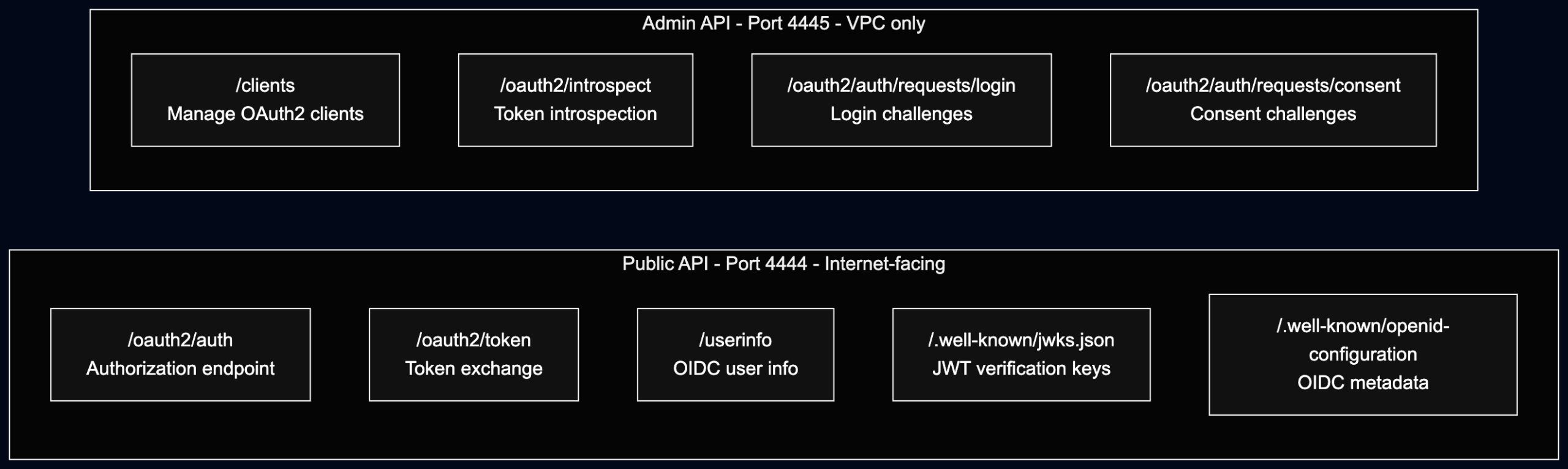
The admin API is only reachable via:
- Private VPC networking from ECS tasks
- SSH/SSM port-forwarding through a bastion host
This is a hard security boundary — no amount of misconfiguration should expose /clients or token introspection publicly.
ECS Configuration
Hydra runs as a stateless container on ECS Fargate. The key environment variables that wire it together:
# Where Hydra thinks it lives (must match the public API Gateway URL)
URLS_SELF_ISSUER=https://your-auth-domain/
URLS_SELF_PUBLIC=https://your-auth-domain/

# Where Hydra sends users for login and consent
URLS_LOGIN=https://your-app-domain/login
URLS_CONSENT=https://your-app-domain/consent

# Use JWT access tokens instead of opaque tokens
STRATEGIES_ACCESS_TOKEN=jwt
URLS_SELF_ISSUER is critical — it becomes the iss claim in every token Hydra issues. If this doesn’t match what your resource servers expect, all JWT validation will fail.
Secrets:
DSN(database connection string) andSECRETS_SYSTEM(Hydra’s cookie/token signing key) are stored in AWS Secrets Manager and injected at task startup. The DSN password must be URL-encoded, andsslmode=requireshould be appended.
Step 1: Registering an OAuth2 Client
OAuth2 clients are registered via the Admin API, which means you need VPC access first — typically via an SSM port-forwarding session to a bastion host.
# Port-forward the Admin API to your local machine via SSM
aws ssm start-session \
  --target <your-bastion-instance-id> \
  --document-name AWS-StartPortForwardingSessionToRemoteHost \
  --parameters '{"host":["<internal-nlb-dns>"],"portNumber":["4445"],"localPortNumber":["4445"]}'
Then create the client:
curl -X POST "http://localhost:4445/clients" \
  -H "Content-Type: application/json" \
  -d '{
    "client_id": "my-frontend-app",
    "grant_types": ["authorization_code", "refresh_token"],
    "response_types": ["code", "id_token"],
    "scope": "openid offline_access profile email",
    "skip_consent": true,
    "redirect_uris": [
      "https://your-app-domain/oauth/callback",
      "http://localhost:8000/oauth/callback"
    ],
    "token_endpoint_auth_method": "none"
  }'
A few things worth calling out:
token_endpoint_auth_method: "none"— This creates a public client (no client secret). Suitable for SPAs and mobile apps that can’t store a secret safely.skip_consent: true— Skips the consent screen for first-party apps where the IdP doesn’t serve external clients.offline_accessscope — Required to receive a refresh token.redirect_uris— Hydra strictly validates the redirect URI on every auth request. IncludelocalhostURIs if developers need to test against a remote Hydra instance.
Verify the client was created:
curl "http://localhost:4445/clients/my-frontend-app"
Step 2: The OAuth2 Authorization Code Flow
This is the sequence that happens every time a user logs in.
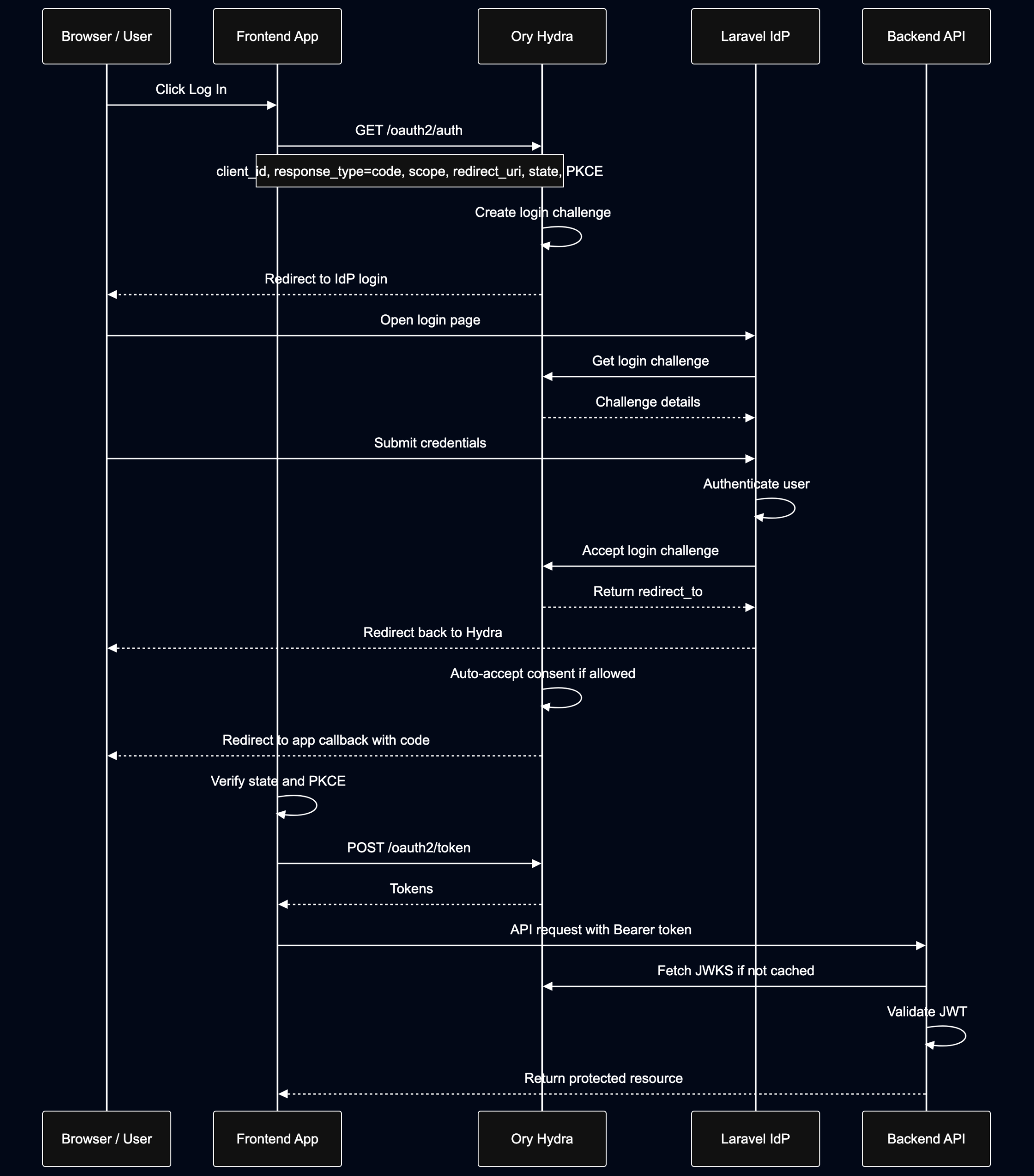
Key security checkpoints
- State parameter — The frontend generates a random
statevalue before the redirect and verifies it on callback. This prevents CSRF attacks. - PKCE — For public clients (SPAs), use
code_challenge/code_verifier(PKCE) to prevent authorization code interception. - Redirect URI validation — Hydra rejects any redirect URI not pre-registered on the client. Never use wildcards.
Step 3: Login Challenge Handling (IdP Side)
When Hydra redirects the user to your IdP, it passes a login_challenge token. Your IdP is responsible for:
- Fetching the challenge from Hydra’s Admin API to get context (which client, which scopes, etc.)
- Presenting a login form to the user
- Authenticating the user (local credentials, SSO, MFA — your choice)
- Accepting or rejecting the challenge via the Admin API
// Laravel IdP — pseudocode for login challenge flow

// 1. Fetch challenge details
$challenge = Http::get($hydraAdminApi . '/oauth2/requests/login', [
    'login_challenge' => request('login_challenge')
])->json();

// 2. If Hydra says the session is still valid, skip re-auth
if ($challenge['skip']) {
    return $this->acceptLoginChallenge($challenge['subject']);
}

// 3. Authenticate user (after form submit)
if (Auth::attempt($credentials)) {
    return $this->acceptLoginChallenge(Auth::id());
}

// 4. Accept the challenge
private function acceptLoginChallenge(string $subject): RedirectResponse
{
    $redirect = Http::put($hydraAdminApi . '/oauth2/requests/login/accept', [
        'subject'     => $subject,
        'remember'    => true,
        'remember_for' => 3600,
    ], ['query' => ['login_challenge' => $this->challenge]])->json();

    return redirect($redirect['redirect_to']);
}
The IdP environment variables that wire this up:
HYDRA_ADMIN_API=http://<internal-nlb-dns>:4445   # VPC-internal only
HYDRA_PUBLIC_API=https://your-auth-domain/
HYDRA_CLIENT_ID=my-frontend-app
HYDRA_CLIENT_REDIRECT_URI=https://your-app-domain/oauth/callback
Step 4: Token Validation in Backend Services
Backend services validate access tokens without calling Hydra — they use Hydra’s public JWKS endpoint to verify JWT signatures locally.
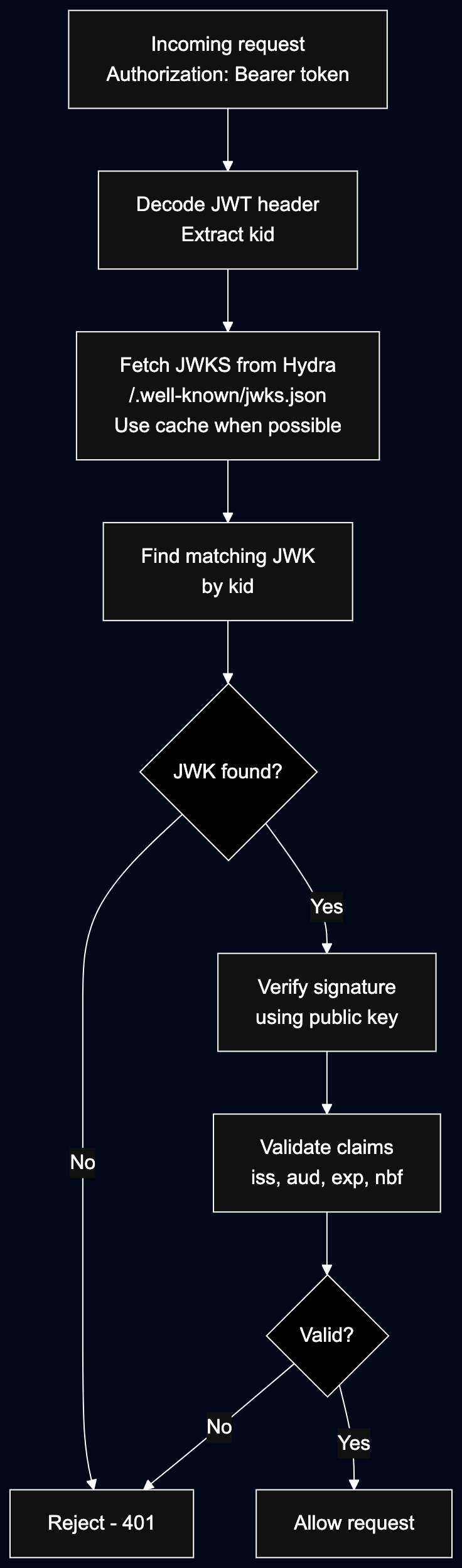
In practice:
# Python example using PyJWT + requests
import jwt
import requests
from jwt.algorithms import RSAAlgorithm

JWKS_URL = "https://your-auth-domain/.well-known/jwks.json"
EXPECTED_ISSUER = "https://your-auth-domain/"
EXPECTED_AUDIENCE = "my-frontend-app"

# Cache the JWKS — it only changes when Hydra rotates keys
jwks = requests.get(JWKS_URL).json()

def validate_token(token: str) -> dict:
    header = jwt.get_unverified_header(token)
    kid = header["kid"]

    # Find matching key
    jwk = next((k for k in jwks["keys"] if k["kid"] == kid), None)
    if not jwk:
        raise ValueError("Unknown signing key")

    public_key = RSAAlgorithm.from_jwk(jwk)

    return jwt.decode(
        token,
        key=public_key,
        algorithms=["RS256"],
        issuer=EXPECTED_ISSUER,
        audience=EXPECTED_AUDIENCE,
    )
Claims to validate:
iss— must matchURLS_SELF_ISSUERaud— must match your registered client ID or resource serverexp— token must not be expiredsub— the user identifier set by your IdP during login acceptance
Local Development
Pointing local development at a remote Hydra instance is straightforward — as long as http://localhost:<port>/oauth/callback is registered as an allowed redirect URI on the client.
Add these to your local .envrc (or .env):
export HYDRA_CLIENT_ID=my-frontend-app
export HYDRA_ADMIN_API=https://your-auth-dev-domain
export HYDRA_PUBLIC_API=https://your-auth-dev-domain
export HYDRA_CLIENT_REDIRECT_URI=http://localhost:8000/callback
Note: Never put
SECRETS_SYSTEMor database credentials in.envrcunless they are development-only values. Use a secret manager or.envfile excluded from version control for anything sensitive.
Security Checklist
Before going live, verify:
- Admin API (port 4445) is not reachable from the public internet
SECRETS_SYSTEMis stored in a secret manager, not in code or environment variable files- Database DSN password is URL-encoded and
sslmode=requireis set - All redirect URIs are exact matches — no wildcards
- Public clients use PKCE (
code_challenge_method=S256) - JWKS is cached with a reasonable TTL (e.g., 5 minutes) to avoid hammering Hydra on every request
stateparameter is validated on the OAuth2 callbackURLS_SELF_ISSUERmatches what resource servers expect in theissJWT claim- Token lifetimes are appropriate for your use case (shorter for access tokens, longer for refresh tokens)
Wrapping Up
Ory Hydra gives you a production-ready OAuth2/OIDC server without locking you into a specific identity provider. The key architectural decisions that made this work well for us:
- Hard VPC boundary for the Admin API — nothing sensitive is ever exposed publicly
- JWT access tokens — resource servers validate locally without a round-trip to Hydra
- IdP owns the UX — Hydra handles the protocol, your app handles the login page
- Stateless Hydra containers — all state lives in PostgreSQL, so scaling is trivial
If you’re building a multi-app platform and need a single sign-on layer you fully control, Ory Hydra is worth the investment. The initial setup is non-trivial, but the separation of concerns pays off as your application portfolio grows.
Have questions about the implementation or want to dig into a specific part of the flow? Drop a comment below.