
This post walks through how we built federated SSO login for a multi-tenant SaaS platform, supporting both Google Workspace and Microsoft Entra ID as external identity providers (IdPs). The architecture sits on top of Ory Hydra — an OAuth2/OpenID Connect server — and handles token verification, user provisioning, and identity linkage entirely in the backend.
Architecture Overview
Our OAuth2 server (Ory Hydra) manages the consent flow and token issuance. The application backend acts as Hydra’s login provider: it owns user identity and decides whether a login is accepted or rejected. External IdPs (Google, Entra ID) are never wired directly into Hydra — they talk to the backend first.
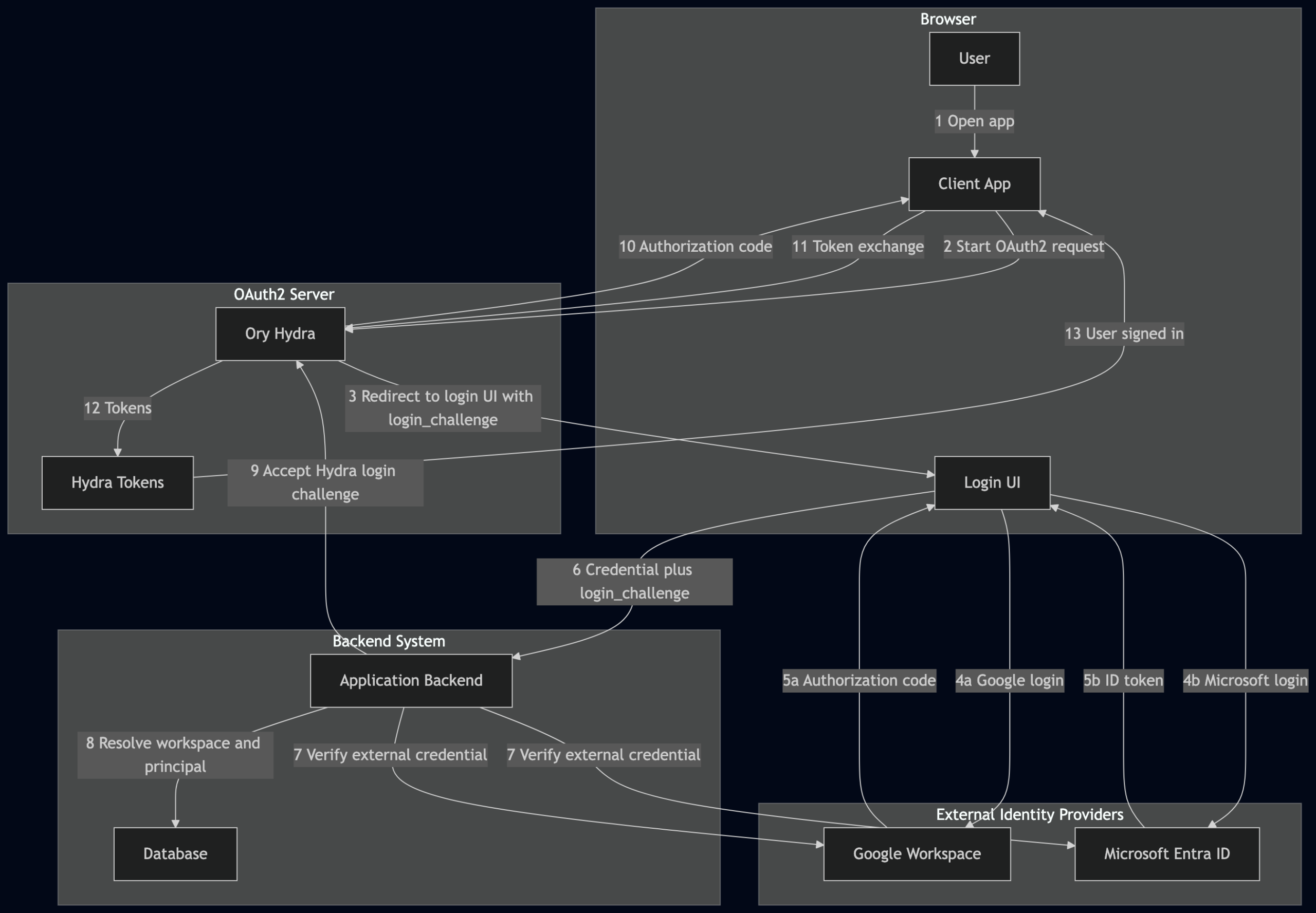
The flow is provider-agnostic at the Hydra layer — it only ever sees a application principal ID as the subject. All IdP-specific complexity lives in the backend.
Data Model
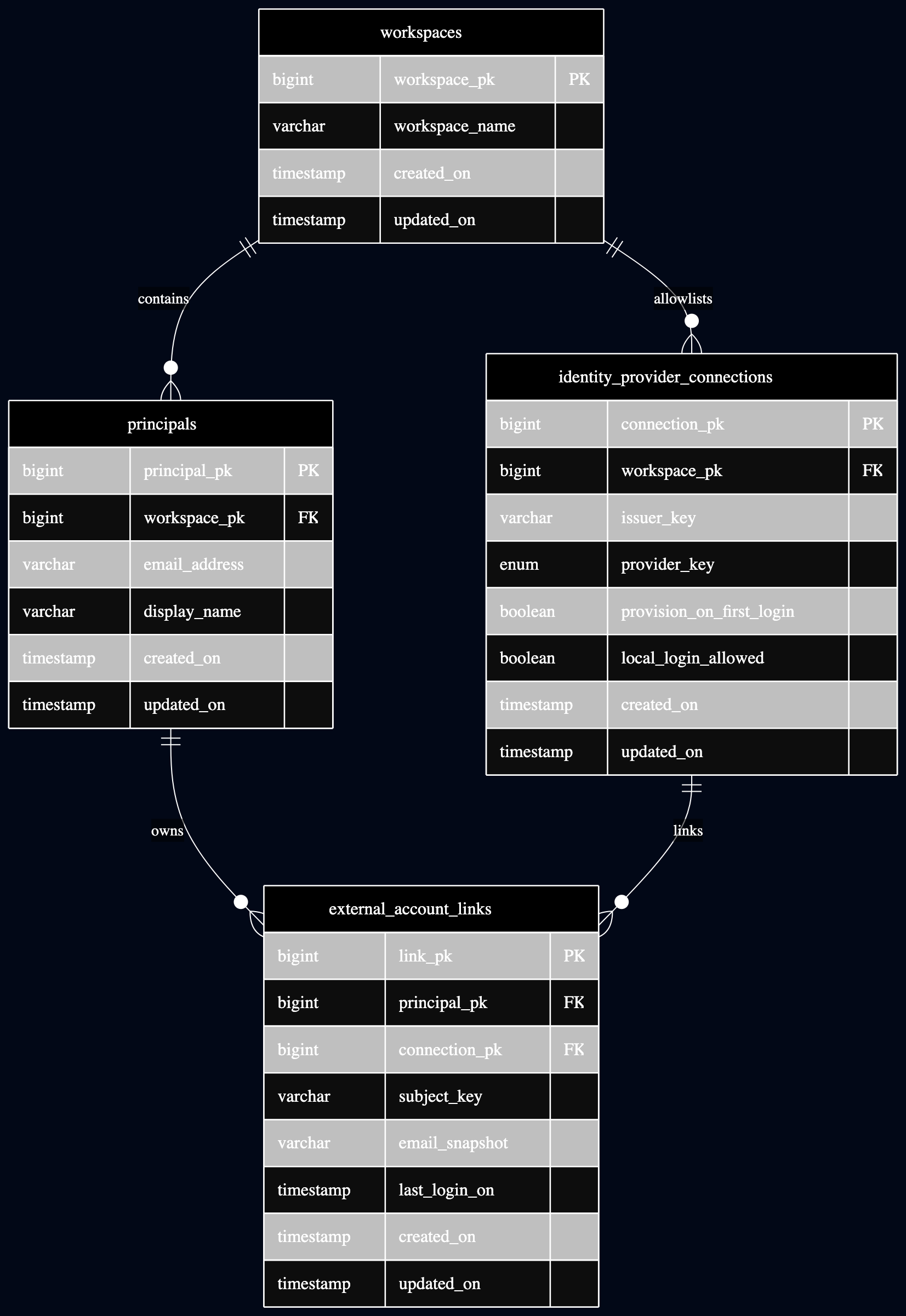
The schema below uses generic product-neutral names. The two SSO-specific tables are identity_provider_connections and external_account_links; workspaces and principals represent the normal application-side workspace and user-account records.
identity_provider_connections — the IdP allowlist
This table maps an external IdP tenant to an application workspace. A login is only accepted if a matching connection row exists. There is no open registration; every external tenant must be explicitly allowlisted.
Key columns:
| Column | Type | Purpose |
|---|---|---|
workspace_pk | bigint FK | The application workspace this IdP connection belongs to |
issuer_key | varchar | Google hd claim or Entra ID tid UUID |
provider_key | enum | google or microsoft_entra |
provision_on_first_login | boolean | Auto-create principals on first successful SSO login |
local_login_allowed | boolean | Future: allow or block password login when SSO is configured |
Unique constraint: (issuer_key, provider_key, workspace_pk) — not just (issuer_key, provider_key). This intentionally allows one external IdP tenant to be allowlisted for multiple application workspaces, which is useful for shared-tenant or parent/subsidiary models. The backend resolves ambiguity using the principal’s existing external account link; if it cannot resolve to exactly one workspace, the login is rejected.
external_account_links — the identity linkage
This table links an application principal to a verified external provider identity. One principal can have multiple external login links, such as Google and Entra ID at the same time.
| Column | Type | Purpose |
|---|---|---|
principal_pk | bigint FK | The local application principal |
connection_pk | bigint FK | The allowlisted IdP connection this login belongs to |
subject_key | varchar | Stable external user identifier from the provider: Google sub, Entra ID oid |
email_snapshot | varchar | Provider-reported email at login time — audit only, not a primary identity key |
Unique constraint: (connection_pk, subject_key) — one external account link per provider connection and external subject.
ON DELETE RESTRICT on external_account_links.connection_pk prevents deleting an IdP connection while linked external identities still exist. This is intentional: remove links first to preserve the audit trail.
Google SSO Flow
Why not Laravel Socialite?
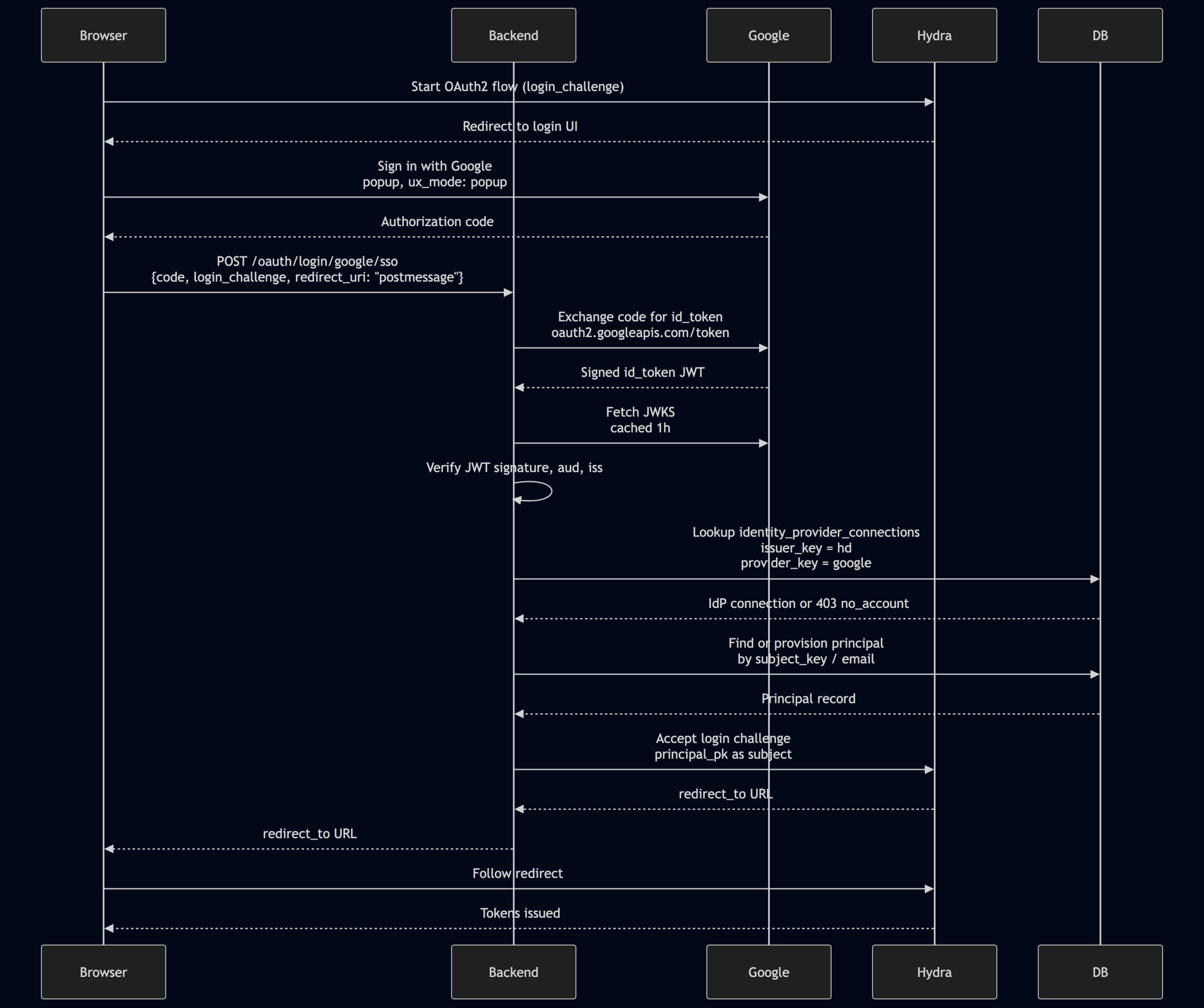
Socialite assumes a server-side redirect flow: backend redirects to Google → Google redirects back to backend. The Google Identity Services popup flow is different — Google returns an authorization code to the frontend popup, and the frontend forwards it to the backend using redirect_uri: 'postmessage'. Socialite has no concept of postmessage and no session state to resume, so we handle the token exchange manually.
Sequence
Token verification
GoogleTokenVerifier exchanges the authorization code at https://oauth2.googleapis.com/token to get a signed id_token JWT, then:
- Fetches Google’s JWKS from
https://www.googleapis.com/oauth2/v3/certs(cached 1 hour). - Verifies the JWT signature.
- Validates
audmatches the configured Google Client ID. - Validates
issisaccounts.google.comorhttps://accounts.google.com.
Key JWT claims (Google)
| Claim | Used as | Notes |
|---|---|---|
sub | subject_key | Stable unique ID across Google apps |
hd | issuer_key | Google Workspace hosted domain. Absent for personal @gmail.com — always rejected |
email | Provisioning / audit | |
name | Display name for provisioning | |
aud | Client ID validation | |
iss | Issuer validation |
Personal Gmail accounts (@gmail.com) carry no hd claim and are always rejected — there is no matching identity_provider_connections row.
Microsoft Entra ID SSO Flow
Key difference from Google
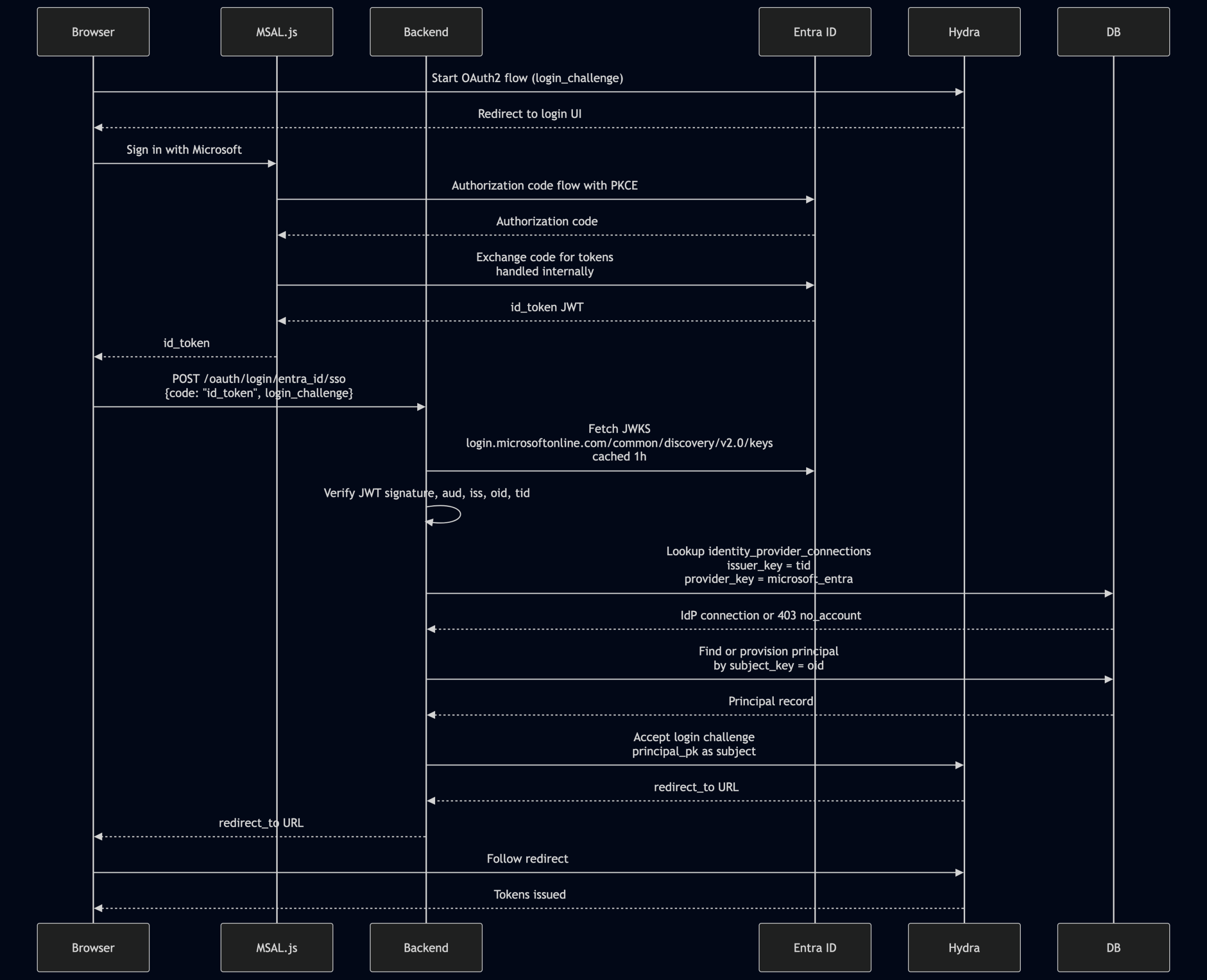
With Google, the frontend receives an authorization code and the backend exchanges it for a token. With Entra ID, MSAL.js handles the PKCE code exchange internally in the browser and hands the resulting id_token JWT directly to the frontend. The backend receives and verifies this JWT directly — no server-side code exchange step.
Sequence
Token verification
EntraIdTokenVerifier fetches JWKS from the common endpoint (https://login.microsoftonline.com/common/discovery/v2.0/keys) so tokens from any Azure AD tenant are verifiable — tenant authorization is enforced downstream by the identity_provider_connections allowlist, not at the JWKS level.
Two quirks to handle:
- Missing
algfield: some Entra JWKS entries omit thealgfield. These default toRS256before being passed to the JWT library. - Stale keys: on a
"kid" invaliderror (Entra rotates keys), the JWKS cache is busted and the decode is retried once automatically.
validateClaims() then checks:
aud: must match the configured Entra Client ID.tid: must be present — used both for issuer construction and tenant lookup.iss: must behttps://login.microsoftonline.com/{tid}/v2.0(derived from the token’s owntidto reject cross-tenant tokens).oid: must be present — used assubject_key.- Email: resolved from
email→preferred_username→upn(Entra does not guarantee theemailclaim even when theemailscope is requested).
Key JWT claims (Entra ID)
| Claim | Used as | Notes |
|---|---|---|
oid | subject_key | Stable object ID across all apps in the tenant. Do not use sub — it is pairwise per-app |
tid | issuer_key | Azure AD tenant UUID |
email / preferred_username / upn | Email (resolved in order) | Entra doesn’t guarantee email claim |
name | Display name for provisioning | |
aud | Client ID validation | |
iss | Issuer validation (constructed from tid) |
Personal Microsoft accounts
The tid for personal Microsoft accounts is the well-known UUID 9188040d-6c67-4c5b-b112-36a304b66dad. These are rejected automatically because no identity_provider_connections row will ever match that tenant.
User Provisioning
Both flows share the same provisioning logic after token verification.
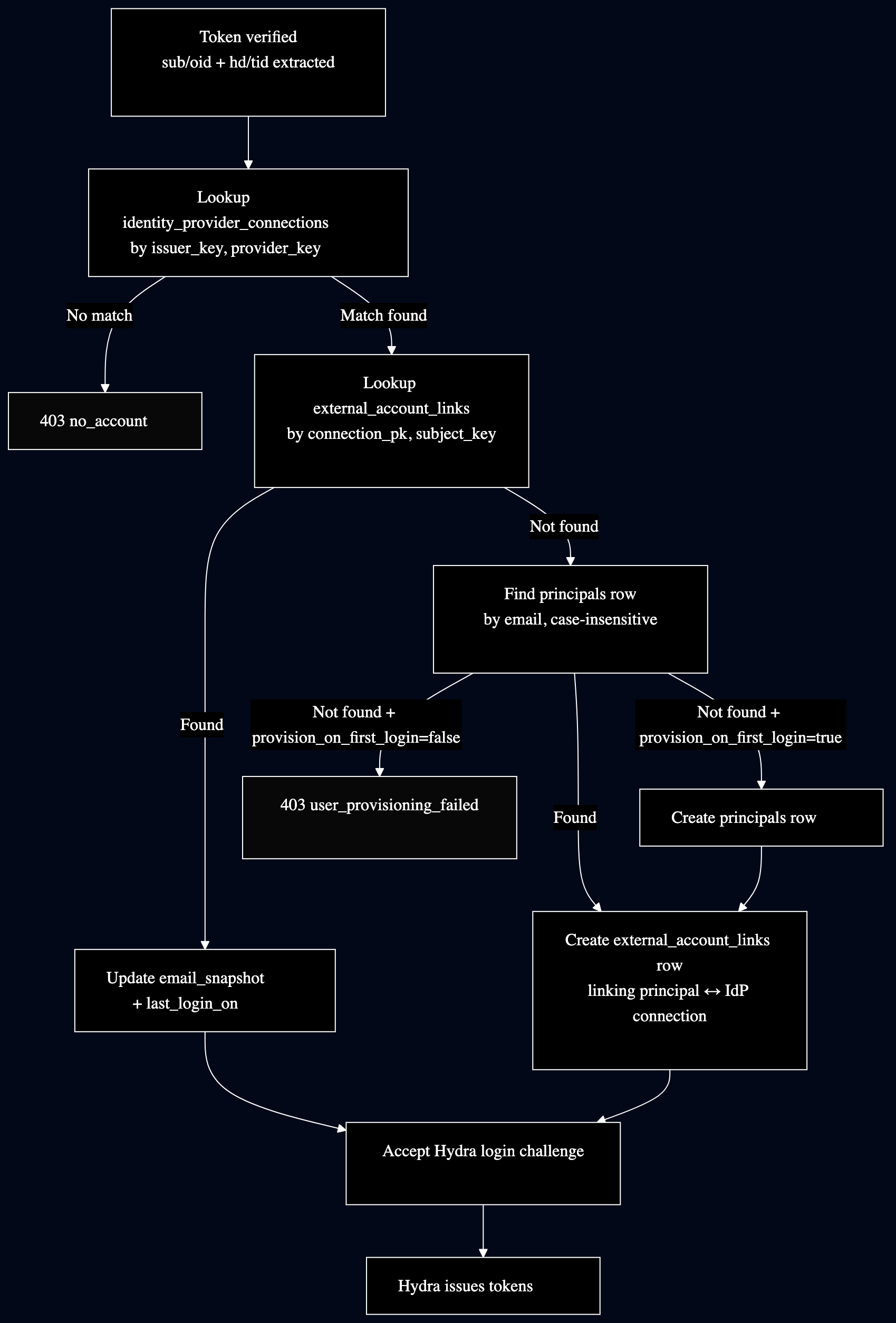
provision_on_first_login: When true, the first SSO login from an unknown email automatically creates a principal. When false, principals must already exist (matched by email, case-insensitively) before they can log in via SSO.
Onboarding a New Workspace
Prerequisites
- The workspace must exist in the
workspacestable.
Step 1: Identify the tenant identifier
| Provider | Claim | Example |
|---|---|---|
hd — Google Workspace hosted domain | acme.io | |
| Entra ID | tid — Azure AD tenant UUID | xxxxxxxx-xxxx-xxxx-xxxx-xxxxxxxxxxxx |
For Google, the hd value is the Google Workspace domain. Personal @gmail.com accounts don’t carry hd and will always be rejected.
For Entra ID, the tid UUID is visible in Azure Active Directory → Overview → Tenant ID.
Step 2: Insert the IdP allowlist row
-- Google
INSERT INTO identity_provider_connections (workspace_pk, issuer_key, provider_key, provision_on_first_login)
VALUES (<workspace_pk>, 'acme.io', 'google', false);

-- Entra ID
INSERT INTO identity_provider_connections (workspace_pk, issuer_key, provider_key, provision_on_first_login)
VALUES (<workspace_pk>, 'xxxxxxxx-xxxx-xxxx-xxxx-xxxxxxxxxxxx', 'microsoft_entra', false);
Set provision_on_first_login = true only if the workspace wants new principals created automatically on first login.
Step 3: Enable the provider
SSO_LOGIN_PROVIDERS=google,entra_id
A provider absent from this list returns 404, even if a identity_provider_connections row exists.
Step 4: Pre-create users (if provision_on_first_login = false)
Each principal email in the principals table must match what the provider sends. For Entra ID, the resolved email falls back through email → preferred_username → upn.
Step 5: Verify
- Attempt a login from a user in the workspace’s allowed tenant/domain.
- On success: confirm an
external_account_linksrow was created. - On failure, check application logs for:
no_account(403): no matchingidentity_provider_connectionsrow — checkissuer_keyandprovider_key.user_provisioning_failed(403): principal not found andprovision_on_first_loginis disabled.invalid_credential(401): token verification failed — check JWKS endpoint reachability.
Revoking access
-- Step 1: remove external account links (required by ON DELETE RESTRICT)
DELETE FROM external_account_links WHERE connection_pk = <connection_pk>;

-- Step 2: remove the IdP allowlist connection
DELETE FROM identity_provider_connections WHERE connection_pk = <connection_pk>;
Design Notes
Why use oid instead of sub for Entra ID?
Entra’s sub claim is pairwise per-application — the same user gets a different sub value for each registered app. The oid (Object ID) is stable across all apps in the tenant and is the correct stable identifier for cross-app identity linkage.
Why use the common JWKS endpoint for Entra ID?
Using a tenant-specific JWKS endpoint would require knowing the tenant before verifying the token — a chicken-and-egg problem. The common endpoint verifies signatures from any Azure AD tenant. Tenant authorization is then enforced by checking the identity_provider_connections allowlist after signature verification, keeping the two concerns cleanly separated.
Why does the frontend forward the credential to the backend instead of having the backend redirect directly to the IdP?
Both IdP flows are initiated from a Hydra login UI page in the browser. The Google popup and MSAL.js flows give the credential to the frontend; the backend can’t participate in the redirect without breaking the popup pattern. The backend acts as a verifier and Hydra login acceptor, not as an OAuth2 client in the traditional sense.
Shared tenant support
The identity_provider_connections unique constraint is on (issuer_key, provider_key, workspace_id), not (issuer_key, provider_key). This means a single IdP tenant (e.g. a Microsoft Entra tenant that manages multiple subsidiaries) can be allowlisted for multiple application workspaces. Ambiguity is resolved by the principal’s existing external_account_links linkage; unresolvable ambiguity results in a rejected login.