
Credential stuffing, brute-force attacks, and automated account takeover attempts are a daily reality for any public-facing web application. Your login endpoint is the most targeted surface in your infrastructure — and it deserves dedicated protection beyond generic firewall rules.
This post walks through a production-grade AWS WAF configuration scoped exclusively to a login endpoint, built with AWS CDK (TypeScript). We’ll cover rule ordering, the Account Takeover Prevention (ATP) managed rule group, IP-based rate limiting, a smart logging filter, and a full alerting pipeline that routes WAF alarms through SNS and Lambda into Slack.
The Architecture
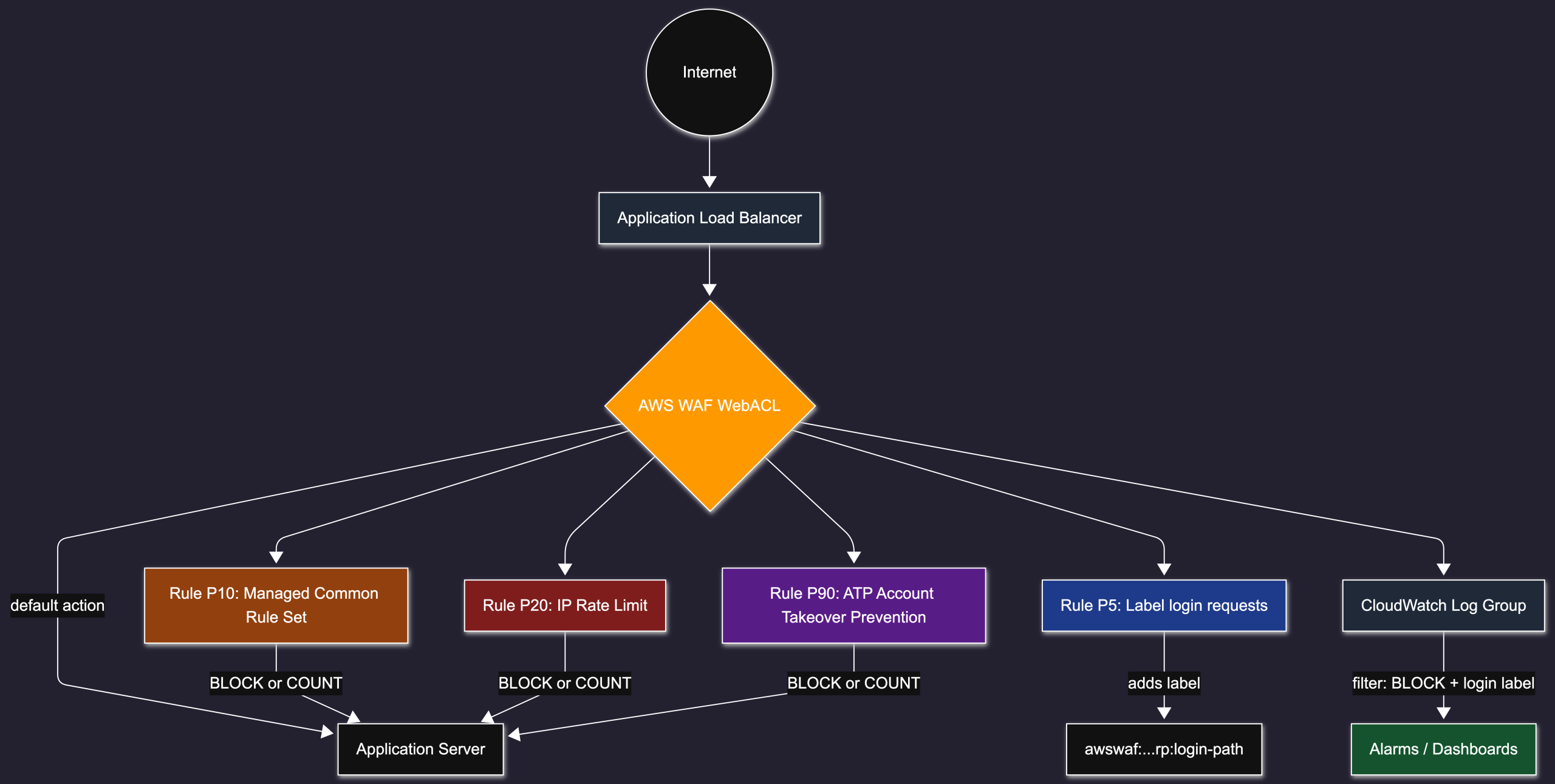
Rather than applying a WAF to every route, we scope all rules tightly to a single path: POST /auth/login. Everything else passes through the default ALLOW action. This keeps costs down (ATP in particular is billed per 100 inspected requests) and avoids false positives on unrelated traffic.
Rule Evaluation Order
WAF evaluates rules from lowest to highest priority number. We exploit this to run cheap filters first and defer the expensive ATP inspection until the obvious junk has already been dropped.

The label applied at priority 5 is the key to keeping logs useful without storing every request — more on that below.
The Rules in Detail
Priority 5 — Request Labeling
Before any blocking happens, we stamp all POST /auth/login requests with a label. This label is propagated through all subsequent rule evaluations and, crucially, into WAF logs.
{
    name: 'Label-PostLoginPath',
    priority: 5,
    action: { count: {} },
    statement: {
        andStatement: {
            statements: [
                // matches HTTP method == POST
                { byteMatchStatement: { searchString: 'POST', fieldToMatch: { method: {} }, ... } },
                // matches URI path == /auth/login exactly
                { byteMatchStatement: { searchString: '/auth/login', fieldToMatch: { uriPath: {} }, ... } },
            ],
        },
    },
    ruleLabels: [{ name: 'rp:login-path' }],
}
This rule never blocks — it just counts and labels. The fully-qualified label becomes awswaf:<account-id>:webacl:<acl-name>:rp:login-path.
Priority 10 — Managed Common Rule Set
AWS’s AWSManagedRulesCommonRuleSet provides baseline protection against common web threats: XSS, SQLi, bad user agents, known malicious IPs, etc. We scope it down to our login andStatement so it only evaluates on the traffic we care about.
In non-production environments we override the action to COUNT so that end-to-end test suites aren’t blocked by WAF rules while we’re tunining.
{
    name: 'AWS-AWSManagedRulesCommonRuleSet',
    priority: 10,
    overrideAction: isProduction ? configuredAction : { count: {} },
    statement: {
        managedRuleGroupStatement: {
            vendorName: 'AWS',
            name: 'AWSManagedRulesCommonRuleSet',
            scopeDownStatement: loginPostScopeDown,
        },
    },
}
Priority 20 — IP Rate Limiting
A coarse but cheap first line against brute-force attempts. We block (or count) any IP that exceeds a threshold of login attempts within a rolling 5-minute window.
{
    name: 'RateLimit-PostLogin',
    priority: 20,
    action: rateLimitActionMode === 'COUNT' ? { count: {} } : { block: {} },
    statement: {
        rateBasedStatement: {
            aggregateKeyType: 'IP',
            limit: loginRateLimit,          // e.g. 100 per 5 minutes
            scopeDownStatement: loginPostScopeDown,
        },
    },
}
Because this runs before ATP (priority 90), IPs that are clearly brute-forcing get dropped before the more expensive ATP analysis runs — saving money and speeding up evaluation.
Priority 90 — Account Takeover Prevention (ATP)
ATP is AWS’s managed rule group for credential stuffing detection. It analyses request patterns, response codes, and credential anomalies to detect automated account takeover attempts. It is billed per inspected request, which is why we put it last.
We configure it with the JSON field paths for credentials so it can inspect the payload:
{
    name: 'AWS-AWSManagedRulesATPRuleSet',
    priority: 90,
    overrideAction: atpActionMode === 'COUNT' ? { count: {} } : { none: {} },
    statement: {
        managedRuleGroupStatement: {
            vendorName: 'AWS',
            name: 'AWSManagedRulesATPRuleSet',
            scopeDownStatement: loginPostScopeDown,
            managedRuleGroupConfigs: [{
                awsManagedRulesAtpRuleSet: {
                    loginPath: '/auth/login',
                    requestInspection: {
                        payloadType: 'JSON',
                        usernameField: { identifier: '/email' },
                        passwordField: { identifier: '/password' },
                    },
                },
            }],
        },
    },
}
Tip: Start ATP in
COUNTmode to measure false-positive rates and estimated cost before switching toBLOCK.
Logging: Filter Aggressively
WAF can log every request, but at scale this generates enormous CloudWatch volume. We use a LoggingFilter to keep only what matters:
- BLOCK actions — anything blocked by any rule
- Requests with the login label — all login attempts, whether allowed or not
Everything else is dropped from logs. This gives you full visibility into attack traffic and login endpoint activity while discarding the noise from the rest of your routes.
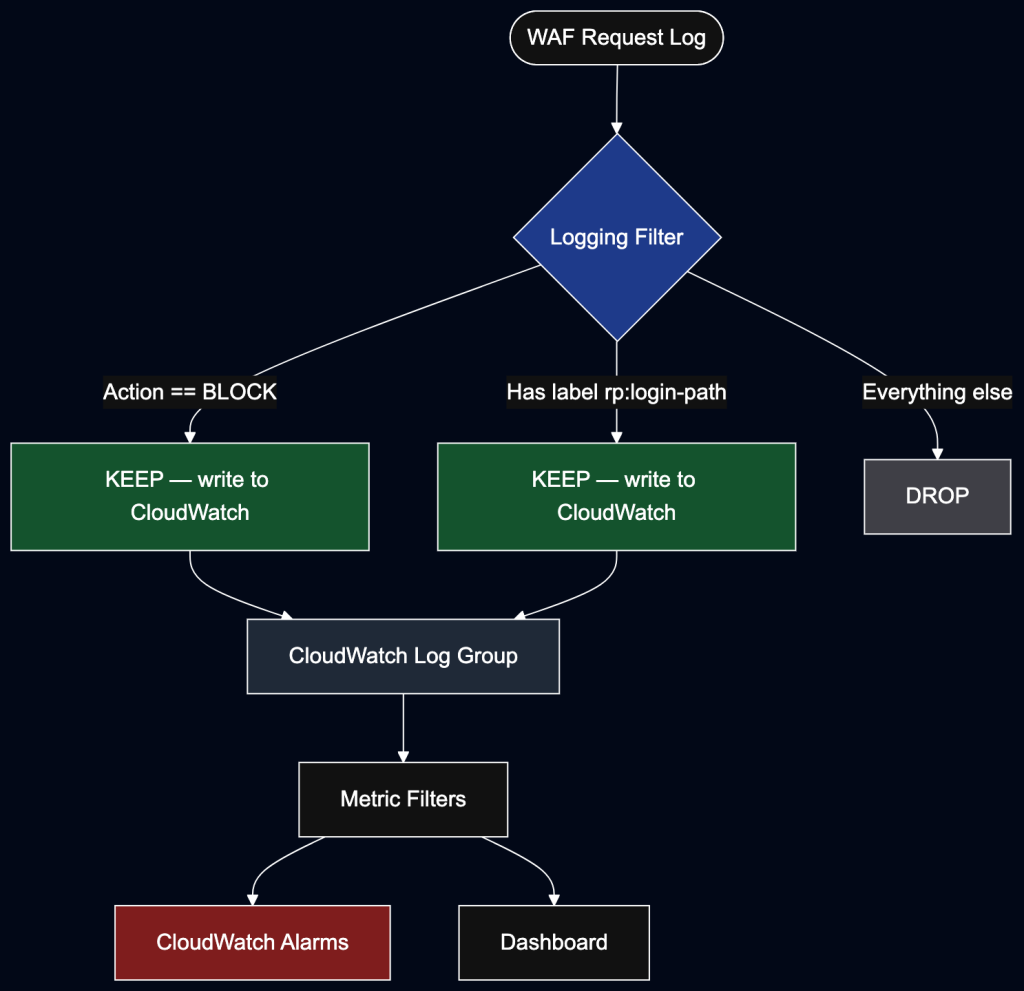
The CDK configuration for this filter:
loggingConfiguration.addPropertyOverride('LoggingFilter', {
    DefaultBehavior: 'DROP',
    Filters: [
        {
            Behavior: 'KEEP',
            Requirement: 'MEETS_ANY',
            Conditions: [{ ActionCondition: { Action: 'BLOCK' } }],
        },
        {
            Behavior: 'KEEP',
            Requirement: 'MEETS_ANY',
            Conditions: [{ LabelNameCondition: { LabelName: fullyQualifiedLoginPathLabel } }],
        },
    ],
})
Note that LoggingFilter is not yet a first-class CDK construct property, so we use addPropertyOverride to inject it into the CloudFormation template directly.
Log Group IAM Permissions
AWS WAF requires explicit IAM permissions to write to CloudWatch. The delivery principal (delivery.logs.amazonaws.com) needs CreateLogStream and PutLogEvents, locked to the specific WAF ARN and account:
wafLogGroup.addToResourcePolicy(new iam.PolicyStatement({
    principals: [new iam.ServicePrincipal('delivery.logs.amazonaws.com')],
    actions: ['logs:CreateLogStream', 'logs:PutLogEvents'],
    resources: [`${wafLogGroup.logGroupArn}:*`],
    conditions: {
        StringEquals: { 'aws:SourceAccount': this.account },
        ArnLike: { 'aws:SourceArn': webAcl.attrArn },
    },
}))
The log group name must start with aws-waf-logs- — this is an AWS requirement enforced at the API level.
Operational Runbook Sketch
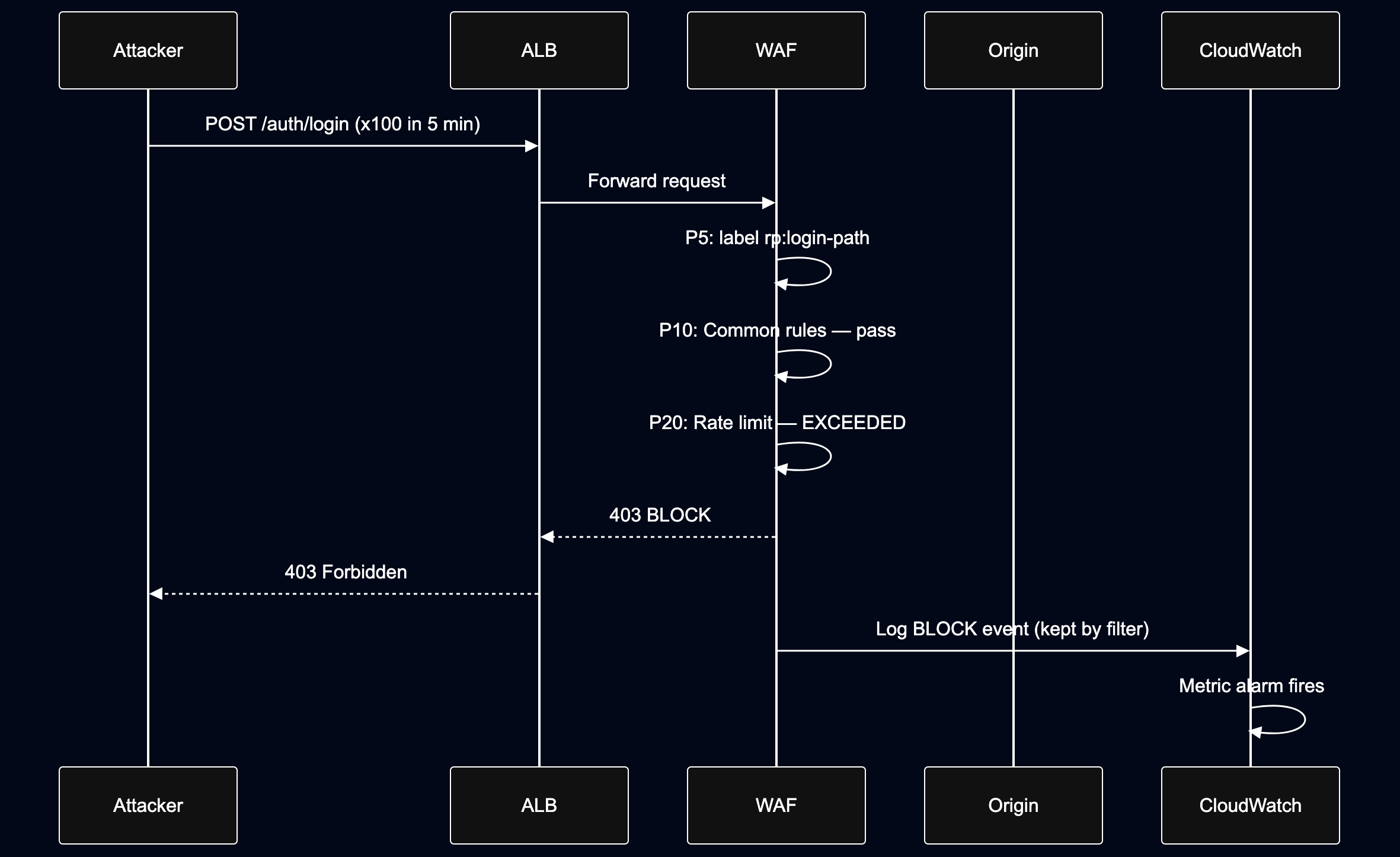
Notifications: Alarms → SNS → Lambda → Slack
Logs tell you what happened. Alarms tell you right now. We wire three CloudWatch alarms to an SNS topic, which triggers a Lambda that formats and posts to a Slack channel via a Slack Workflow webhook.
End-to-end notification flow
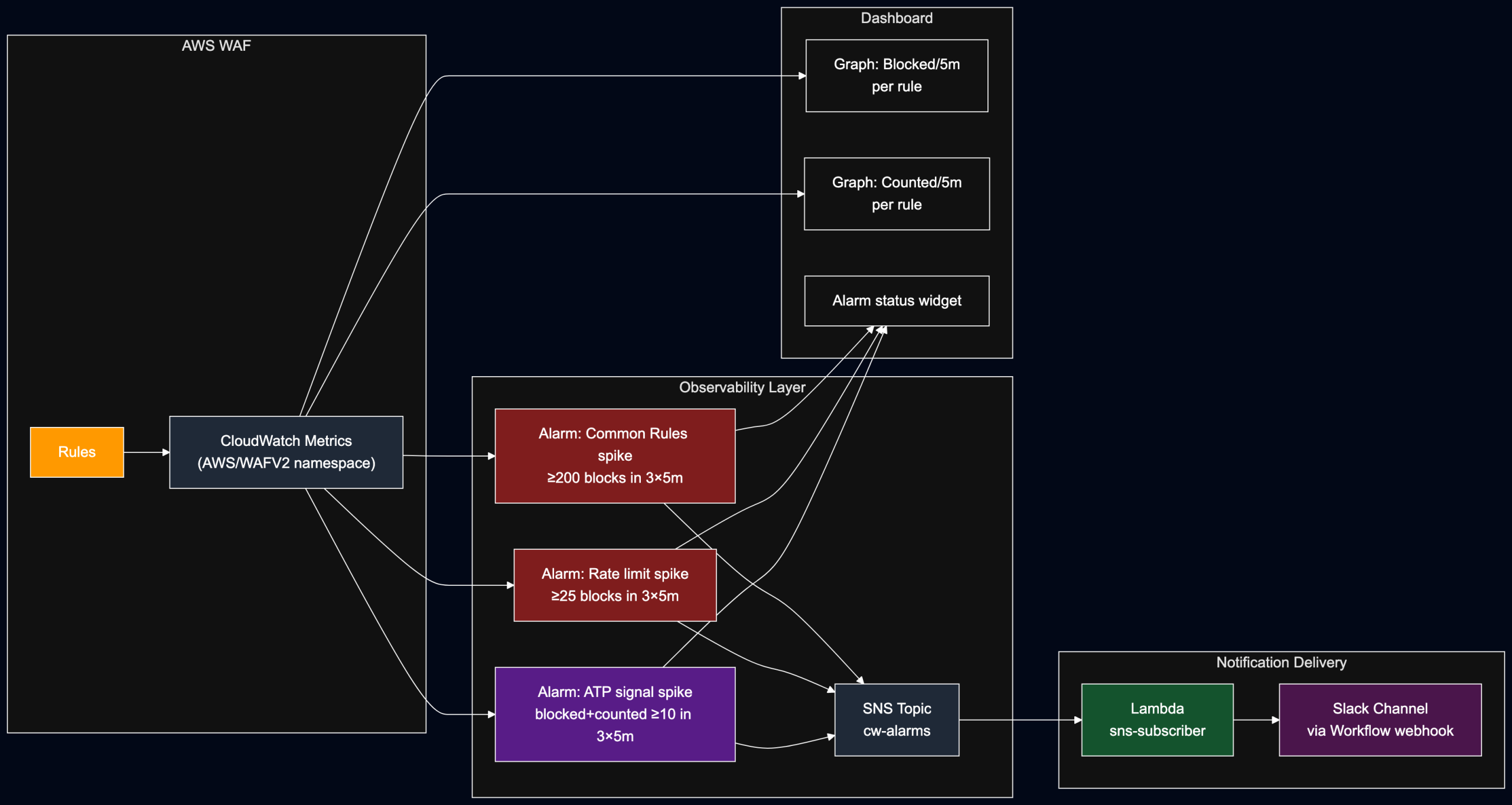
CloudWatch Dashboard and Alarms
The dashboard stack creates graph widgets for blocked and counted requests per rule, an alarm-status widget, and three alarms — one per rule tier.
// Blocked requests per rule (5-min sum)
const createWafMetric = (metricName: string, dimensionsMap: Record<string, string>) =>
    new cloudwatch.Metric({
        namespace: 'AWS/WAFV2',
        metricName,        // 'BlockedRequests' or 'CountedRequests'
        dimensionsMap,     // { WebACL, Region, Rule }
        statistic: 'Sum',
        period: Duration.minutes(5),
    })

// ATP uses a math expression: blocked + counted = total signal
const atpSignal = new cloudwatch.MathExpression({
    expression: 'm1+m2',
    usingMetrics: { m1: atpBlockedRequests, m2: atpCountedRequests },
    period: Duration.minutes(5),
    label: 'ATP signal (blocked + counted)',
})
We treat ATP’s combined blocked + counted as the signal metric rather than blocked alone. In COUNT mode (during rollout), blocks are zero — but counted hits still indicate real attack traffic.
const alarms = {
    commonRules: new cloudwatch.Alarm(this, 'common-rules-spike', {
        alarmName: 'WAF common rule set blocked spike',
        metric: commonRuleSetBlockedRequests,
        threshold: 200,
        evaluationPeriods: 3,
        datapointsToAlarm: 2,         // 2 of 3 windows must breach
        treatMissingData: cloudwatch.TreatMissingData.NOT_BREACHING,
    }),
    rateLimit: new cloudwatch.Alarm(this, 'rate-limit-spike', {
        alarmName: 'WAF login rate-limit spike',
        metric: rateLimitBlockedRequests,
        threshold: 25,
        evaluationPeriods: 3,
        datapointsToAlarm: 2,
        treatMissingData: cloudwatch.TreatMissingData.NOT_BREACHING,
    }),
    atp: new cloudwatch.Alarm(this, 'atp-signal-spike', {
        alarmName: 'WAF ATP signal spike',
        metric: atpSignal,
        threshold: 10,
        evaluationPeriods: 3,
        datapointsToAlarm: 2,
        treatMissingData: cloudwatch.TreatMissingData.NOT_BREACHING,
    }),
}

// Add all alarms to the SNS topic
Object.values(alarms).forEach(alarm =>
    alarm.addAlarmAction({ bind: () => ({ alarmActionArn: cloudwatchAlarmsTopicArn }) })
)
The 2-of-3 evaluation window (datapointsToAlarm: 2, evaluationPeriods: 3) avoids paging on a single noisy data point while still catching sustained spikes within 15 minutes.
Dashboard widgets:
dashboard.addWidgets(
    new cloudwatch.GraphWidget({
        title: 'Blocked requests by rule (5m)',
        left: [atpBlockedRequests, commonRuleSetBlockedRequests, rateLimitBlockedRequests],
    }),
    new cloudwatch.GraphWidget({
        title: 'Counted requests by rule (5m)',
        left: [atpCountedRequests, commonRuleSetCountedRequests, rateLimitCountedRequests],
    }),
    new cloudwatch.AlarmStatusWidget({
        title: 'WAF alarm status',
        alarms: Object.values(alarms),
        sortBy: cloudwatch.AlarmStatusWidgetSortBy.STATE_UPDATED_TIMESTAMP,
    }),
)
SNS Topic
The SNS topic is the fan-out hub between CloudWatch and any downstream consumer. We export its ARN so it can be imported by the dashboard stack (to wire alarm actions) and the Lambda stack (to subscribe):
const alarmsTopic = new sns.Topic(this, 'cw-alarms-topic', {
    topicName: 'cw-alarms',
})

new CfnOutput(this, 'CwAlarmsTopicArn', {
    value: alarmsTopic.topicArn,
    exportName: 'CwAlarmsTopicArn',   // imported by alarm actions and Lambda stack
})
Using Fn.importValue in the dashboard and Lambda stacks rather than passing the ARN directly keeps the stacks independently deployable.
Lambda: SNS → Slack
The Lambda subscribes to the SNS topic, parses the CloudWatch alarm payload, and POSTs a structured message to a Slack Workflow webhook URL.
const subscriberLambda = new lambdaNodeJs.NodejsFunction(this, 'sns-subscriber', {
    entry: 'lib/lambda/handlers/sns-subscriber.ts',
    handler: 'handler',
    runtime: lambda.Runtime.NODEJS_22_X,
    timeout: Duration.seconds(10),
    retryAttempts: 2,
    environment: {
        SLACK_WF_URL: slackWorkflowUrl,  // injected at deploy time, not hardcoded
    },
})

alarmTopic.addSubscription(new snsSub.LambdaSubscription(subscriberLambda))
The handler itself is intentionally thin — parse the SNS envelope, extract the CloudWatch alarm fields, POST to Slack:
import type { SNSEvent, Context } from 'aws-lambda'
import { fetch } from 'undici'

type CwAlarm = {
    AlarmName: string
    AlarmDescription: string
    NewStateValue: string      // 'ALARM' | 'OK' | 'INSUFFICIENT_DATA'
    NewStateReason: string
}

export const handler = async (event: SNSEvent, _ctx: Context): Promise<void> => {
    await Promise.all(
        event.Records.map(async ({ Sns }) => {
            const msg = safeParse(Sns.Message) as CwAlarm
            const slackUrl = process.env.SLACK_WF_URL
            if (!slackUrl) { console.error('SLACK_WF_URL not set'); return }

            await fetch(slackUrl, {
                method: 'POST',
                headers: { 'Content-Type': 'application/json' },
                body: JSON.stringify({
                    alarmName:        msg.AlarmName,
                    alarmDescription: msg.AlarmDescription,
                    newStateValue:    msg.NewStateValue,
                    newStateReason:   msg.NewStateReason,
                }),
            })
        })
    )
}
The Slack Workflow on the receiving end maps those four fields to a formatted channel message, keeping the Lambda free of Slack-specific Block Kit markup.
Why a Lambda instead of direct SNS → Slack?
| Approach | Advantages | Trade-offs |
|---|---|---|
| SNS → Slack directly | Simplest path. No Lambda code. Fewer deployed components. | Messages are usually raw and noisy. Formatting and routing options are limited. |
| SNS → Lambda → Slack | Cleaner Slack messages. Easy to extract only the useful alarm fields. Supports routing, retries, filtering, enrichment, and future integrations. | Adds one small Lambda to deploy and maintain. |
For this setup, the Lambda option is the better production default because alert readability matters. A noisy alarm that nobody understands quickly becomes ignored.
Alarm Thresholds Rationale
| Alarm | Metric | Threshold | Window | Rationale |
|---|---|---|---|---|
| Common rules spike | BlockedRequests (common) | ≥ 200 | 2 of 3 × 5m | Baseline scanner noise; alert only on sustained volume |
| Rate limit spike | BlockedRequests (rate limit) | ≥ 25 | 2 of 3 × 5m | Brute-force — even 25 IPs/5m is worth a look |
| ATP signal spike | BlockedRequests + CountedRequests (ATP) | ≥ 10 | 2 of 3 × 5m | ATP is precise; 10 hits is already a meaningful signal |
Start conservative and tune downward once you have baseline data. The treatMissingData: NOT_BREACHING setting prevents false alarms when traffic drops to zero overnight.
Key Takeaways
- Scope everything down. Don’t run expensive rules against your entire traffic — use
scopeDownStatementto target only the paths that need it. - Order by cost, not severity. Cheap rules (label, common rules, rate limit) run first. ATP runs last.
- Start in COUNT. Especially for ATP and rate limiting, observe before blocking. The metrics tell you the false-positive rate before it affects real users.
- Filter your logs. Default-drop everything except BLOCKs and labeled login traffic. Your CloudWatch bill (and on-call team) will thank you.
- Parameterise per environment. Production blocks; staging counts. Automated tests shouldn’t fight your WAF.
Full Stack Structure (CDK)
LoginWafStack
├── CfnWebACL (REGIONAL, attached to ALB)
│   ├── Rule P5  — Label-PostLoginPath (COUNT + label)
│   ├── Rule P10 — AWSManagedRulesCommonRuleSet (scoped)
│   ├── Rule P20 — RateLimit-PostLogin (IP-based)
│   └── Rule P90 — AWSManagedRulesATPRuleSet (scoped, JSON credentials)
├── CfnWebACLAssociation → ALB ARN
├── LogGroup (aws-waf-logs-*)
│   └── Resource Policy (delivery.logs.amazonaws.com)
└── CfnLoggingConfiguration
    └── LoggingFilter (DROP default, KEEP BLOCK + login label)
This pattern composes well — you can apply the same approach to a password reset endpoint, an OTP endpoint, or any other high-value path that warrants dedicated protection.